function getCookie(cname) {
let name = cname + "=";
let decodedCookie = decodeURIComponent(document.cookie);
let ca = decodedCookie.split(';');
for(let i = 0; i <ca.length; i++) {
let c = ca[i];
while (c.charAt(0) == ' ') {
c = c.substring(1);
}
if (c.indexOf(name) == 0) {
return c.substring(name.length, c.length);
}
}
return "";
}
//const loggedIn = getCookie("JWT-TOKEN");
//if(loggedIn.length){
//newUrl = new URL(window.location.href);
//if(!newUrl.searchParams.has("cd")) {
// newUrl.searchParams.set("cd", true);
//window.location.href = newUrl.href;
//}
//}
<!--(function(w,d,s,l,i){w[l]=w[l]||[];w[l].push({'gtm.start':
new Date().getTime(),event:'gtm.js'});var f=d.getElementsByTagName(s)[0],
j=d.createElement(s),dl=l!='dataLayer'?'&l='+l:'';j.async=true;j.src=
'https://www.googletagmanager.com/gtm.js?id='+i+dl;f.parentNode.insertBefore(j,f);
})(window,document,'script','dataLayer','GTM-PDKTG5L');-->
<!-- -->
<!--
(function(h,o,t,j,a,r){
h.hj=h.hj||function(){(h.hj.q=h.hj.q||[]).push(arguments)};
h._hjSettings={hjid:3277744,hjsv:6};
a=o.getElementsByTagName('head')[0];
r=o.createElement('script');r.async=1;
r.src=t+h._hjSettings.hjid+j+h._hjSettings.hjsv;
a.appendChild(r);
})(window,document,'https://static.hotjar.com/c/hotjar-','.js?sv=');
-->
function analyticsInit() {
if (window.gtmDidInit) {
return false;
}
window.gtmDidInit = true;
(function(w,d,s,l,i){w[l]=w[l]||[];w[l].push({'gtm.start':
new Date().getTime(),event:'gtm.js'});var f=d.getElementsByTagName(s)[0],
j=d.createElement(s),dl=l!='dataLayer'?'&l='+l:'';j.async=true;j.src=
'https://www.googletagmanager.com/gtm.js?id='+i+dl;f.parentNode.insertBefore(j,f);
})(window,document,'script','dataLayer','GTM-PDKTG5L');
(function(h,o,t,j,a,r){
h.hj=h.hj||function(){(h.hj.q=h.hj.q||[]).push(arguments)};
h._hjSettings={hjid:3277744,hjsv:6};
a=o.getElementsByTagName('head')[0];
r=o.createElement('script');r.async=1;
r.src=t+h._hjSettings.hjid+j+h._hjSettings.hjsv;
a.appendChild(r);
})(window,document,'https://static.hotjar.com/c/hotjar-','.js?sv=');
var googleOptimize = document.createElement('script');
googleOptimize .setAttribute('src','https://www.googleoptimize.com/optimize.js?id=OPT-KHT7PBM');
document.head.appendChild(googleOptimize);
};
document.addEventListener('scroll', analyticsInit);
document.addEventListener('mousemove', analyticsInit);
document.addEventListener('touchstart', analyticsInit);
Dictionary in the SuperMemo.com app for iOS - SuperMemo
show top banner: 1
Main navigation
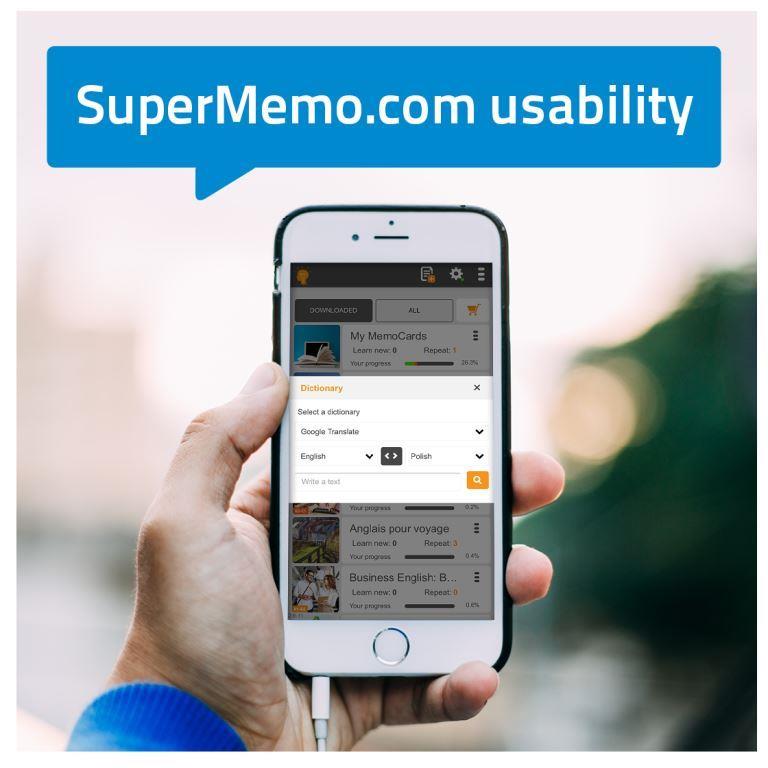
Dictionary in the SuperMemo.com app for iOS
New feature on SuperMemo.com! An in-app Dictionary is now available also for iOS users.
With this function you can easily check the meaning of unknown words and create your own collection of MemoCards.
How do you use the Dictionary on iOS?
Open the menu in the top right corner. Choose the Dictionary – a pop-up with some options will appear. You can now look up your word in the SuperMemo vocabulary base or use Google Translate. Select the language or languages of your translation. Enter your word or phrase and tap the magnifying glass button to find the meaning.
How do you create a MemoCard from the Dictionary?
When your word is already translated, tap the “Create a MemoCard” button. You can easily change the position of the text (question vs answer) by using the grey button (with arrows) in the bottom left corner. When your MemoCard is ready, tap the “Save” button.
We hope you’ll find this useful!
The SuperMemo Team
Related Posts
MemoCards: What are they?
In the SuperMemo.com app we decided to coin and use a new MemoCard term. What we mean by MemoCard is a chunk of information, usually in the form of a question...
New iOS app version now available!
Opt for modern and convenient learning with the SuperMemo mobile app. Read on to discover what you can find in the new iOS version and how to use the features...
© 2026 SuperMemo World sp. z o.o.
Icon chevron up
<!---->