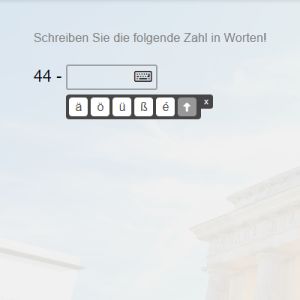
Good news for all our SuperMemo.com website users: we have recently added special keyboards with language-specific signs in all our courses online.
Filling in gaps in online courses has never been easier.
Whenever you come across a gap-filling exercise in your online course, you will see a small icon with a keyboard next to it. Click on the icon and a keyboard with your language-specific signs will appear. Click the letter that you need to fill in the gap. Then close the keyboard and check your answer as usual. Installing your language keyboard is no longer necessary!
The keyboard will also be available in our apps soon! We will let you know when it is ready.
From this post, you will learn about language immersion, one of the methods of foreign language learning, and get to know the latest feature – MemoChat,...
Before starting to learn a new skill, it's worthwhile to spend some time planning the next steps and adapting the schedule to your lifestyle. Find out...
Did you know that you can search through all courses in SuperMemo.com: both online, and in PC Windows, Android and iOS apps? By now, you are probably familiar...